When I explain a system like the AOSP camera stack, a 2D diagram is not enough. The app calls CameraManager, Binder takes the call to cameraserver, the camera service talks to the HAL, and the HAL drives a V4L2 driver in the kernel. At the same time, frames come back through gralloc buffers and SurfaceFlinger. On a whiteboard this becomes many boxes and crossing arrows. You lose the layers, or you lose the links.
I wanted a better way to see this for a long time, so I built Archi3D. You describe your system in a small text file: the elements, their ports and the links between them. Archi3D shows it in 3D. Containers are levels on top of each other, so you can see the nesting. You can rotate, zoom in and click on things. It is open source, and it works best inside VS Code.
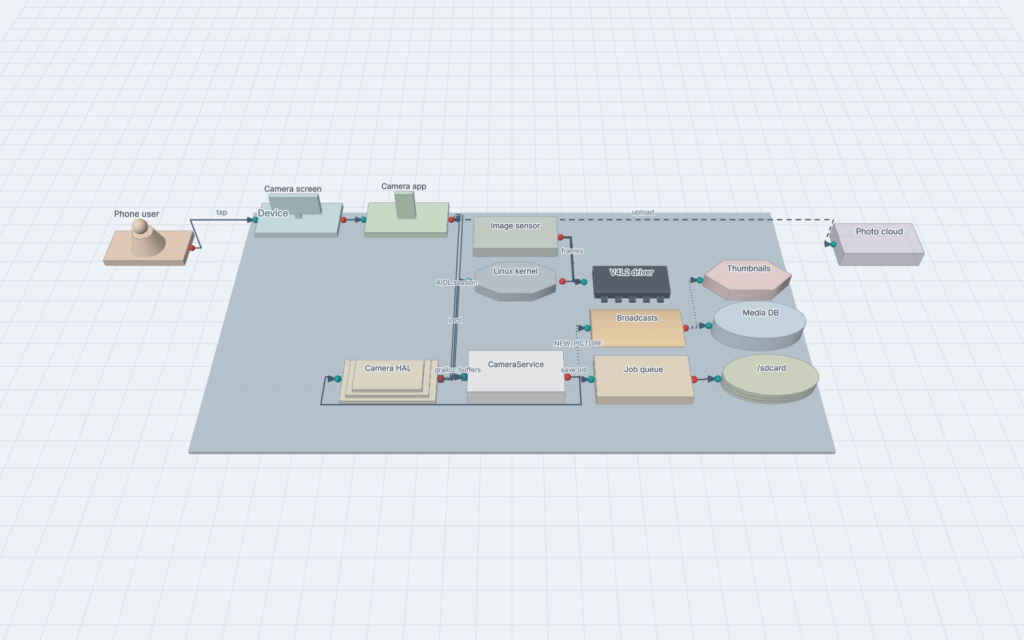
Start in VS Code
Archi3D is a VS Code extension. Your architecture is a text file next to your code, and the 3D view is next to the file. You can review it in a pull request like any other file. The picture is always up to date, because it is drawn from the text every time.
- Install it. Search for Archi3D in the Extensions view, or run
code --install-extension M-H-H.archi3d. - Create a file with the extension
.arch3dand describe a few parts of your system. The next section shows how. - Open the preview. Use the button in the editor title,
Ctrl+K V(Cmd+K Von Mac), or Archi3D: Open 3D Preview to the Side in the command palette.
What the extension does:
- The preview updates while you type. The camera stays where you left it.
- Click a block to go to the line where it is defined. Double click to fly in.
- Errors and warnings show in the editor and in the Problems panel. Everything that is valid is still drawn.
- Save the view as a PNG, or export one HTML file that anyone can open in a browser.
- It also works for Mermaid
architecture-betafiles (.mmd). - Everything works offline. The layout engine and the font are inside the extension.
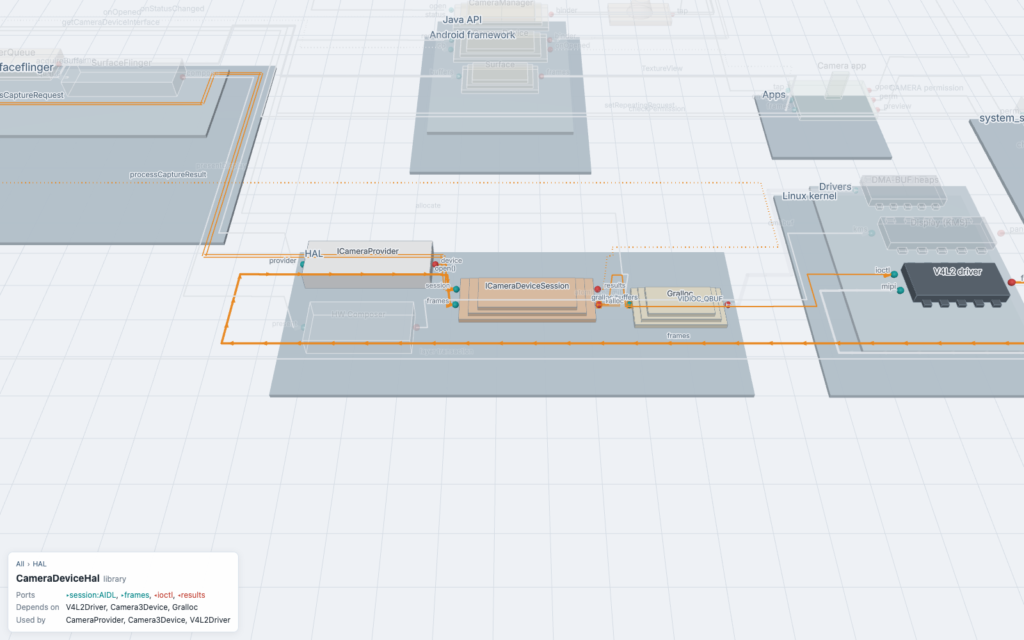
If you prefer the browser, the same app also runs as a web page from the GitHub repository.
How it works
A model is a small text file. One line for each element, one line for each link, and { } for nesting. This is a part of the AOSP camera example in the repository:
system NativeServices "Native services" {
  container cameraserver {
    service CameraService   in: connect:AIDL   out: hal:AIDL, cb
    service Camera3Device   in: submit:AIDL    out: hal:AIDL, buffers
  }
}
system HAL {
  library CameraDeviceHal "ICameraDeviceSession"  in: session:AIDL, frames  out: ioctl
  library Gralloc         in: alloc
}

CameraManager.binder  -> CameraService.connect : connectDevice()
Camera3Device.hal    <=> CameraDeviceHal.session : processCaptureRequest
CameraDeviceHal.ioctl -> V4L2Driver.ioctl : VIDIOC_QBUF
V4L2Driver.frames     >> CameraDeviceHal.frames : frames
CameraDeviceHal       <> Gralloc : gralloc buffers
The keyword (service, library, driver, device, database, topic…) only picks the 3D shape. in: is what an element provides and out: is what it needs. A port can have a type, for example AIDL. The arrow says how the two sides talk, and each kind has its own line style:
| Arrow | Meaning | AOSP example |
|---|---|---|
-> | call and wait for the answer | AIDL call, ioctl |
=> | send a message, don’t wait | oneway AIDL, explicit Intent |
~> | event for anyone who listens | broadcast, callback |
<=> | session that stays open | bound service, HAL session |
>> | data that keeps flowing | camera frames, audio |
<> | shared memory or data | gralloc buffers, ashmem |
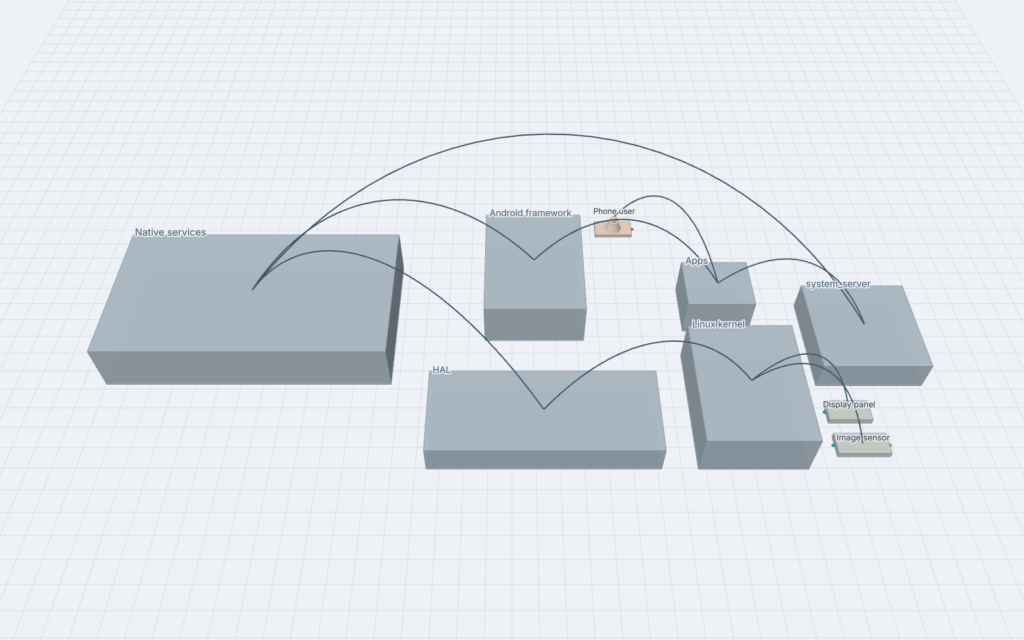
Inside, Archi3D reads the file, builds a model and lays it out in 2D with ELK. ELK is a layout engine that understands nested boxes and ports. Then every nesting level goes one floor higher, and three.js draws it in the browser. There is no game engine. When you zoom out, the containers close and you only see the links between them. When you zoom in, they open and show the elements, ports and labels.
Why 3D?
3D has a bad name in visualization. Things hide behind other things, and perspective makes sizes hard to compare. But the research says more than “3D is bad”. Mitchell and Ware found that people could follow paths in 3D graphs about ten times bigger than in 2D, but only when they could move the view (Mitchell & Ware, 2008). In an experiment with 41 developers, the 3D tool CodeCity gave 24% more correct answers in 12% less time than an IDE and a spreadsheet (Wettel, Lanza & Robbes, ICSE 2011).
So two things matter: the depth must mean something, and you must be able to move. This is how Archi3D does it:
- Height is nesting. Every container level is one floor higher than its parent.
- You move the view. Rotating is what makes the depth easy to read, so drag, zoom and fly in are the main way to use it.
- Distance decides the detail. From far away you see a few closed blocks. Close up you see the elements, ports and labels. This is called semantic zoom.
- Selection hides the noise. Click an element, and it and its direct links become orange while the rest fades. Click a container, and you see the links that cross its border.
- Links can be bundled. With bundling on, links between closed containers follow the nesting tree, so a busy overview shows a few clear bundles.
Built in small steps
Archi3D is written in TypeScript and runs in the browser. The steps are simple: read the text, build a model, lay it out in 2D, lift it to 3D and draw it. Everything before the drawing is plain data, so every step has its own unit tests. The 3D view is tested with screenshots from fixed camera positions.
I built it in 15 small steps. A step was done only when the tests passed and the screenshots looked right. The build planis in the repository. It also works offline: no CDN and no network calls. A test model with 1,000 elements lays out in under a second and is drawn with about ten draw calls.
What’s next
The current version is 0.2.0. Next on the list:
- A better editor with completion and go to definition, by moving the language to Langium.
- Delegated interfaces: a container can pass one of its ports to the element that implements it.
- Tags on elements, for example the team or the technology.
- Your own colors for each element or kind.
Archi3D is MIT licensed and on GitHub. If you work on AOSP, Android apps or Linux, try to model a part of your system and tell me where the language or the view is not good enough. Issues and pull requests are welcome.
Try it
Install Archi3D from the VS Code Marketplace, create a .arch3d file and open the preview. The setup, a first model, and the full reference for the language, the controls and the commands are on the next page: