This page describes the .arch3d language, version 1. It is a small language with one statement on each line. You describe elements, their ports, and the links between them. Every rule here comes from the grammar in the repository.
At a glance
# A comment. // works too.
kind Name ["Title"] [in: port, port:Type] [out: port]   # an element
kind Name ["Title"] [in: ...] [out: ...] {             # a container
  ...                                                  # anything, nested
}                                                      # closes the last container
From[.port] -> To[.port] [: label]                     # a link
From[.port] ~> To1, To2 [: label]                      # one link to several targets
From[.port] event To[.port] [: label]                  # a link written with a word
File basics
- Files use the extension
.arch3d. - One statement on each line: an element, a container, a closing
}or a link. #or//starts a comment until the end of the line. It does not start a comment inside a quoted title.- Empty lines and indentation are ignored. Indent for readability.
- A mistake doesn’t stop the file. The parser skips the bad line and goes on, so the 3D view still shows everything that is valid.
Elements
kind Name ["Title"] [in: port, port...] [out: port, port...]user Person "Phone user"
app Camera "Camera app" out: bind
service CamSvc "CameraService" in: aidl
database MediaDB- kind picks the 3D shape and nothing else. The keywords are in the next section. Any other word is allowed and is drawn as a plain box.
- Name starts with a letter or
_, then letters, digits,_or-. It must be unique in the whole file, also across containers. - Title is optional text in double quotes. It is shown as the label instead of the name, so the name can stay short. A title may contain spaces and
#. Write\"for a quote and\\for a backslash. - Links always use the name, never the title.
Element keywords
The list is short on purpose. The same words work for Android apps, AOSP and Linux.
| Keyword | Drawn as | Android app | AOSP | Linux |
|---|---|---|---|---|
user (or actor) | a person | the phone user | a developer with adb | a user at the shell |
ui | a screen | Activity, Fragment, Compose screen | SystemUI, Settings | GTK or Qt window, terminal |
app | a phone | the app (APK) | Camera, Launcher | desktop application |
service | a box | Service, WorkManager worker | system_server services, native daemons | daemon, systemd unit |
library | stacked layers | AAR, Jetpack library | HAL implementation, libbinder | shared library (.so) |
driver | a chip | kernel driver under a HAL | kernel module | |
kernel | a flat octagon | Linux kernel, binder driver | kernel, a subsystem | |
device | a box on feet | sensor | camera sensor, modem | USB device, hardware |
database (or db) | a cylinder | Room, SQLite | MediaProvider database | PostgreSQL, SQLite |
cache | a hexagon | LruCache | thumbnail cache | Redis, page cache |
storage | stacked disks | files, SharedPreferences | /data, /sdcard | file system, block device |
queue | a low box | Handler and MessageQueue | Looper queue | message queue |
topic | a pipe | broadcast, Flow | broadcast Intents, event log | D-Bus signals, MQTT topic |
external | a see-through box | your backend server | a vendor part outside AOSP | a remote host |
Other words such as component, system, container, group or domain are drawn as plain boxes. They are good names for containers.
Ports
Ports are the interfaces of an element.
service Orders   in: api, events   out: db, pay
service Gateway out: orders:REST, search:gRPCin:lists what the element provides. These ports are drawn on the left side, in teal.out:lists what the element needs. These ports are drawn on the right side, in red.- A port can have a type after a colon:
orders:REST. If both ends of a link have a type and the types differ, you get warning W201. - Ports are optional. You can declare an element with no ports and still link it.
Containers
A line that ends with { opens a container. } closes the last one that is open.
system Shop "Online shop" {
  app Mobile "Shop app"
  container Backend {
    service  Orders   in: api   out: db
    database OrderDB  in: db
  }
}- A container can hold elements and other containers, as deep as you need.
- Every nesting level is drawn one floor higher in 3D.
- Any word can be the kind of a container.
system,containeranddomainare common. - A container can have a title and ports, like an element.
- Several
}can share one line:} }. - Links can point at a container:
Frontend -> Backend : REST.
Links
From[.port] arrow To[.port] [, To[.port] ...] [: label]
From[.port] word  To[.port] [, To[.port] ...] [: label]
User -> Mobile : tap
Mobile.api -> Orders.api : HTTPS
Orders ~> Mail, Analytics : OrderPlaced
Orders.db call OrderDB.db
OrderDB <- Orders- Ports are optional. Without a port, the link uses the first port of the right direction. If there is none, a port without a name is made.
- Undeclared ports are made for you.
A.x -> B.ycreatesxas anoutport onAandyas aninport onBif they don’t exist. - Label is everything after
:until the end of the line. - Several targets.
A ~> B, C, D : labelmakes three links with the same kind and label. - Right to left.
A <- Bis the same asB -> A. It takes only one target. - Names, not paths. Write
OrderDB, notShop.Backend.OrderDB. - Words as names. An element can still be named like a link word:
service event in: xdeclares an element calledevent.
Link kinds
There are six kinds. Pick by how the two sides talk, not by the technology.
| Arrow | Word | Means | Drawn as | Android and AOSP | Linux |
|---|---|---|---|---|---|
-> (or -->) | call | ask and wait for the answer | solid line | method call, AIDL call, Binder transaction | function call, syscall, ioctl, D-Bus method |
=> | message | send, don’t wait, one receiver | dashed line | explicit Intent, Handler.post, oneway AIDL | message queue, socket send |
~> | event | tell anyone who listens | dotted line | broadcast Intent, LiveData or Flow, callbacks | signal, uevent, D-Bus signal, inotify |
<=> | session | a connection that stays open, both ways | two thin lines, arrows at both ends | bound service with AIDL, HAL with callbacks | Unix socket, TCP connection |
>> | stream | data that keeps flowing | thick line with flow marks | camera frames, audio, sensor data | pipe, V4L2 buffers, ALSA |
<> | shared | both use the same memory or data | wide see-through band, squares at the ends | ashmem, gralloc buffers, a shared file | shared memory, mmap |
message, event and stream count as asynchronous. The other three are synchronous.
Errors and warnings
The codes are stable, so you can search for them. Every message has a line and a column.
| Code | Type | When |
|---|---|---|
| E001 | error | The line is not a valid statement. Also a title with no closing quote, or a trailing comma. |
| E002 | error | } but no container is open |
| E003 | error | A container is never closed. Shown on the line where it starts. |
| E101 | error | A name is defined twice |
| E102 | error | A link uses a name that doesn’t exist |
| E103 | error | An element links to itself |
| W201 | warning | Both ports have a type and the types differ |
| W202 | warning | An in port is used as a link source, or an out port as a target |
| W301 | warning | Import: a Mermaid line that is not supported was skipped |
Importing Mermaid and D2
Archi3D reads Mermaid architecture-beta files (.mmd) in the web app and in VS Code. The web app also reads D2 files (.d2). An imported file is turned into the same model as an .arch3d file.
Mermaid architecture-beta
| Mermaid | Becomes |
|---|---|
group id(icon)[Title] in parent | a container |
service id(icon)[Title] in parent | an element. The icon picks the kind: database and disk → database, internet → external, serverand cloud → service |
a:R --> L:b (also -- and <--) | a call. The sides L, R, T, B become the port sides |
a:R <--> L:b | a session |
anything else, such as junction | skipped with warning W301 |
architecture-beta
    group shop(cloud)[Shop]
    service web(internet)[Web] in shop
    service api(server)[API] in shop
    service db(database)[Database] in shop
    web:R --> L:api
    api:R --> L:db
D2 (web app only)
| D2 | Becomes |
|---|---|
| a shape with children | a container |
shape: cylinder or stored_data | database |
shape: queue | queue |
shape: person or c4-person | user |
| any other shape | a plain box |
| arrows at both ends | session |
| dashed connection | message |
| any other connection | call |
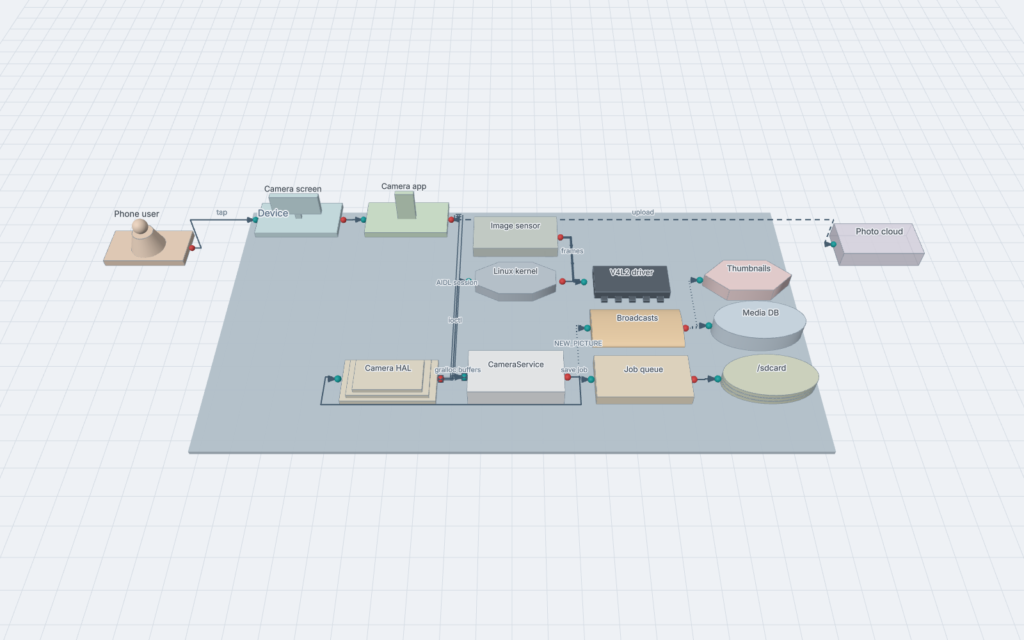
A complete example
# A photo is taken and saved
user User "Phone user"
system Phone {
  app Camera "Camera app"        in: done   out: open
  container Framework {
    service CameraService        in: connect   out: hal, saved
    database MediaDB "Media DB"  in: save
  }
  library CameraHal "Camera HAL" in: session   out: ioctl
  driver V4L2 "V4L2 driver"      in: ioctl
}
external Cloud "Photo cloud"     in: upload

User               -> Camera : tap
Camera.open        -> CameraService.connect : openCamera()
CameraService.hal <=> CameraHal.session : HAL session
CameraHal.ioctl    -> V4L2.ioctl : VIDIOC_QBUF
V4L2              >> CameraHal : frames
CameraService      => MediaDB.save : insert
CameraService.saved ~> Camera.done, Cloud.upload : NEW_PICTURE
Grammar (EBNF)
file       = { line } ;
line       = ws [ statement ] [ comment ] newline ;
statement  = close | node | edge ;
close      = "}" { ws "}" } ;
node       = kind ws name [ ws title ] { ws portlist } [ ws "{" ] ;
title      = '"' { char except '"' and "\" | "\" char } '"' ;
portlist   = ("in:" | "out:") ws port { ws? "," ws? port } ;
port       = ident [ ":" ident ] ;
edge       = ref ws? link ws? ref { ws? "," ws? ref } [ ws ":" ws label ] ;
link       = arrow | ws linkword ws ;
arrow      = "->" | "-->" | "=>" | "~>" | "<=>" | ">>" | "<>" | "<-" ;
linkword   = "call" | "message" | "event" | "session" | "stream" | "shared" ;
ref        = ident [ "." ident ] ;
kind       = ident ;  name = ident ;
ident      = letter { letter | digit | "_" | "-" } ;
label      = { any character except newline } ;
comment    = ("#" | "//") { any character except newline } ;
Not in version 1 yet
- Delegation:
port => Child.portinside a container, to pass a container’s port to the element that implements it. - Tags:
component X [team: payments, tech: Go]. - Your own colors for each element or kind.